How to keep the same character from one episode to the next
A character people recognize is what turns videos into a series. Here is why a face changes from one AI video to the next, and the method to make it stay put.
By the ClipDivision team6 min read
The short answer
To keep the same character from one AI video to the next, you need a fixed reference: a profile describing five traits that never change (build, a facial detail, colors, outfit, voice) and a reference image reused in every shot. Without it, each generation starts from scratch and the face drifts. ClipDivision keeps that profile and image for every character, checks each shot against the profile and redoes the shot if the face has changed.
Key takeaways
- A face changes because each generation starts from scratch when nothing locks it.
- Five fixed traits are enough: build, a facial detail, colors, outfit, voice.
- A signature detail is recognizable in one second, even small on a phone.
- Fewer characters and a recurring setting: the series holds together better.
- YouTube accepts AI used to visualize a character and a story you invented[1].
Why a face changes from one video to the next
A video generator remembers nothing. For every shot it starts from your description and invents an image that matches it. But “a young brunette woman in a green dress” describes thousands of possible faces: without a fixed reference you get a cousin in every shot, never the same person.
The problem grows with a series. In a one-off video, a face that varies a little goes unnoticed. By episode three, the audience no longer recognizes the heroine, and the story falls apart with her.
The fix comes down to two things: a description that leaves nothing to chance, and a reference image the tool reuses in every shot.
The character profile: five fixed traits
Write a short profile and never change it. Five traits are enough.
- Build: height, frame, posture. “Small, narrow shoulders, always standing very straight.”
- A facial detail: the one people notice first. “Freckles on the nose, hazel eyes.”
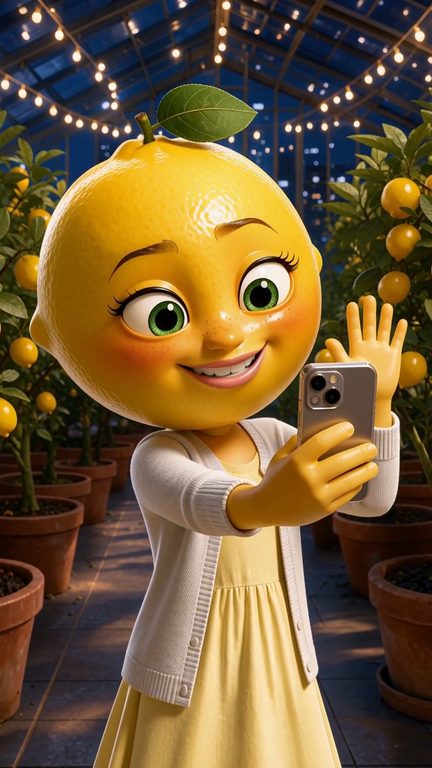
- Colors: two or three, always the same. “Bright yellow lemon skin, a green leaf on her head.”
- Outfit: just one, like a cartoon costume. “White dress with a round collar, yellow ribbon.”
- Voice: its tone in two words. “Soft and self-assured.”
The profile describes what never changes. What does change, the emotion, the action, the place, goes into the idea for each episode.
The signature detail
Among those traits, pick one that people recognize in one second, even tiny on a phone: a veil, a waxed mustache, a red scarf, a leaf on the head. That is the one the audience remembers and mentions in the comments.
The signature detail has a second job: it is your quality check. If the veil is gone or the scarf has changed color, the shot needs redoing, even if the face looks close.
The Series page shows the same lemon-headed heroine in four scenes of one series: in the greenhouse, at sunset, at night and on the wedding day.
A short cast and a recurring setting
Every character you add is one more face to hold. Three regular characters are enough for a series, and extras do not need to be recognized.
Do the same with places. Two or three recurring settings, a kitchen, a greenhouse, an office, give the viewer landmarks and limit surprises. A fixed setting is described like a character: its light, its colors and one object that is there every time.
How to bring your character back in the idea
Once the character exists, do not describe it again in every video: call it by name and say only what changes.
- Vague: “A young lemon woman finds a letter in the greenhouse.”
- Precise: “Lina finds a letter hidden under the old lemon tree in the greenhouse. She recognizes her father's handwriting.”
In ClipDivision you do not even have to describe the character again: you pick it from your library and write only what happens. In Series mode, the next episode starts with the same characters.
Check before you post
Before posting, look at the first and the last shot side by side. Ask yourself three questions: is it the same face, the same outfit, the same signature detail?
Listen too. A voice that changes from one episode to the next breaks the character as surely as a face that changes.
If one shot drifts, do not redo the whole video. Redo that shot alone. In ClipDivision, that is what Studio mode is for.
Lock your character in five steps
- 1
Write the profile
Five traits that will never change: build, facial detail, colors, outfit, voice.
- 2
Choose the signature detail
One element people recognize in one second, even small.
- 3
Give it a name
A short first name. You will use it in every idea.
- 4
Keep the same reference image
It is the model for every shot, not a new description.
- 5
Check the first and the last shot
Same face, same outfit, same detail. If not, redo the shot that drifts.
Why it matters to the platforms too
A stable character is not only a matter of taste. In its monetization policies, YouTube gives as an accepted example using AI to visualize a unique character and narrative you invented. On the other hand, it does not pay for AI-generated content made with generic templates that give the impression of mass production, or for unrelated AI clips stitched together to surprise or shock[1].
One more rule to keep in mind: if your character looks like a real person, TikTok requires the “AI-generated content” label. For a cartoon character or a fruit, it is encouraged[2]. The details are in our guide to TikTok's AI label.
What ClipDivision does on its own
In ClipDivision, every character has a profile and a reference image used in every shot. After the shots are made, each one is checked against the profile: if the face has changed, the shot is redone without costing you a credit.
A character also keeps its voice from one video to the next. The same mechanics power AI influencers, whose face is locked once and for all.
For a series, see our guide to making an AI TikTok series, or start from an idea on the TikTok mini-series page. The first 15-second video is free, then plans start at $9.99 a month.
Put it into practice
A ready-to-run idea to try what you just read. Tap it and it lands in the slate.
Episode 2: under the old lemon tree in the greenhouse, Lina, the young lemon-headed woman, finds a letter written by her father.
Cult character
FAQ
Why does my AI character's face keep changing?
Because each generation starts from your description, and a description matches thousands of faces. You need a reference image reused in every shot and a profile that does not change.
How many characters can stay consistent?
As many as you like in theory, but a short series holds together better with three regular characters. Each character has its own profile and its own reference image.
Can a character change outfits?
Yes, if it is an event in the story, like a wedding dress. Keep the face, the colors and the signature detail, and let the scene itself explain it to the viewer.
Does this work for an AI influencer too?
Yes. An AI influencer is a character whose face, outfit and voice are locked once and for all. At ClipDivision it is always made up: never the face of a real person.
Sources
Pages read on November 15, 2026. Platform rules change: check the official page before you post.
- [1]YouTube, YouTube channel monetization policies
- [2]TikTok, About AI-generated content